

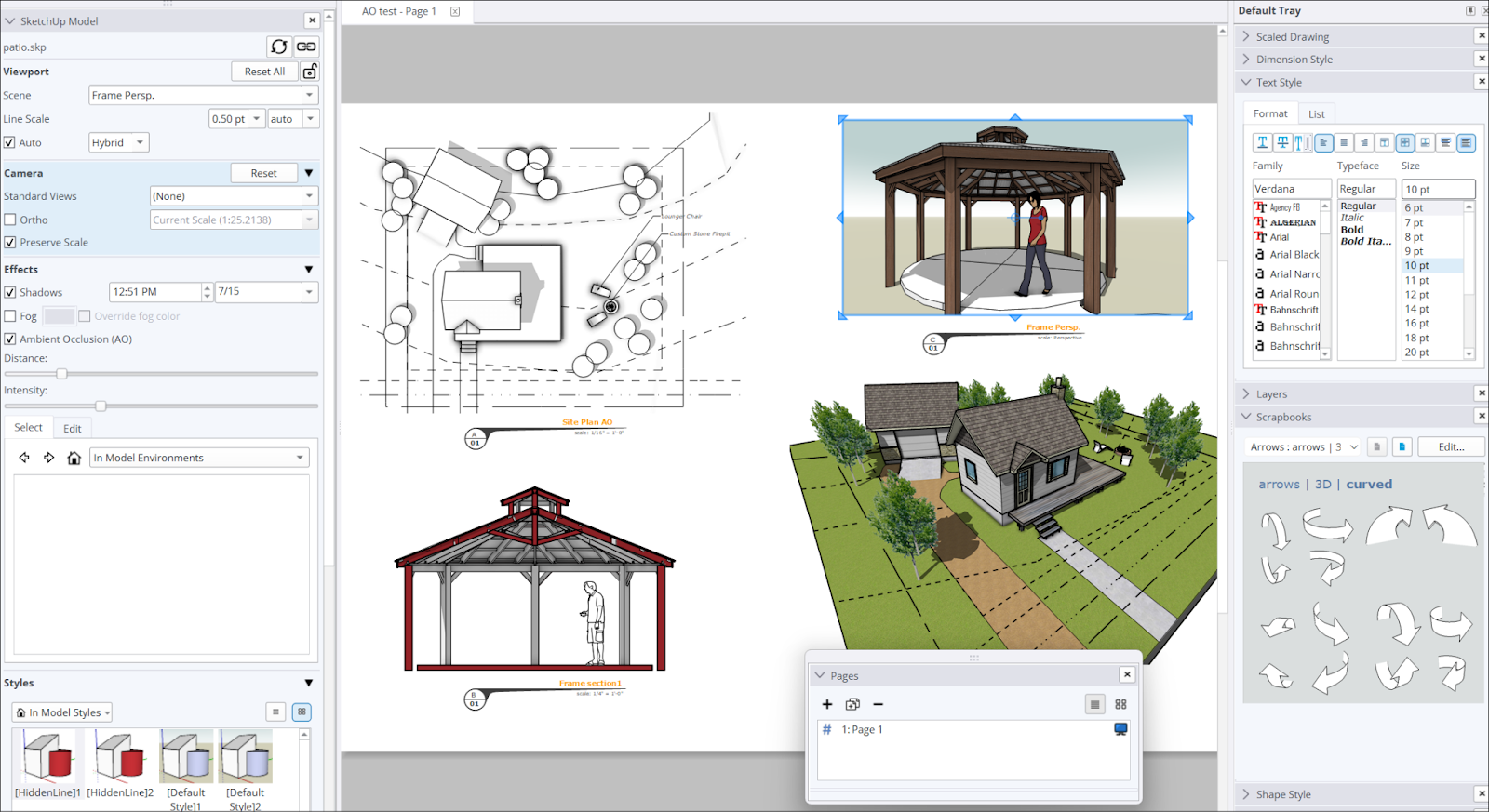
    LayOut preview

    LayOut Reviews, pricing and alternatives 2026

    2D documentation linked to SketchUp models: plans, sections, dimensions and client decks.

    Best for
    What it does
    Plugin sketchup
    Plans 2d
    Plans techniques
    Document delivery
    Presentation client

    LayOut

    ToolTrim Verdict
    3.9/5
    Decent

    LayOut makes sense for SketchUp-based architects and designers producing professional technical documentation; for light or free layout work, other tools fit better.

    Pricing verified on

    Our take

    Understanding LayOut.

    2D documentation linked to SketchUp models: plans, sections, dimensions and client decks.

    Practical uses

    • Produce detailed construction plans from a SketchUp model.
    • Create professional architectural presentations.
    • Generate plan sheets for DWG exchange.

    Pros and cons

    What LayOut does especially well — and the limits to anticipate.

    Pros

    • Native integration with SketchUp Pro and Studio.
    • Associative dimensions that automatically update.
    • DWG and PDF export for professional workflows.
    • Complete professional technical drawing tools.
    • Pre-built architectural templates and symbols.

    Cons

    • Cannot be purchased standalone—depends on SketchUp subscription.
    • Overall SketchUp subscription cost can be high.
    • Learning curve if you don't use SketchUp.
    • No free standalone version.

    LayOut: when it makes sense.

    LayOut makes sense for SketchUp-based architects and designers producing professional technical documentation; for light or free layout work, other tools fit better.

    Keep if

    You work with SketchUp Pro or Studio on architecture projects.. You need to convert 3D models into detailed 2D technical documents.

    Challenge if

    You're looking for a standalone, free layout tool.. You don't use SketchUp.

    How much does LayOut cost?

    This tool is included in Sketchup Pro. See pricing and plans on the suite's page.
    Free0 €

    Inclus avec SketchUp Pro

    Inclus avec SketchUp Pro

    Inclus dans SketchUp Pro

    Official pricing sourceverified on

    LayOut Summary

    Category
    tool.
    Price from
    Free (Inclus avec SketchUp Pro).
    Best for
    professionals.
    Avoid if
    You're looking for a standalone, free layout tool.; You don't use SketchUp..
    ToolTrim verdict
    LayOut makes sense for SketchUp-based architects and designers producing professional technical documentation; for light or free layout work, other tools fit better.

    Our verdict on LayOut.

    Why this verdict

    Decent

    LayOut is hard to replace short-term, a free tier to test before paying, clearly documented use cases.

    Tool FAQ

    Frequently asked questions about LayOut

    Pricing, usage, alternatives, and context: useful answers before adding one more tool to your stack.

    What is LayOut used for?

    2D documentation linked to SketchUp models: plans, sections, dimensions and client decks.

    How much does LayOut cost?

    LayOut costs €0 (free) (Inclus avec SketchUp Pro plan). Price verified on 2026-05-10.

    Is LayOut suitable for beginners?

    LayOut suits most professionals. See the "Who is it for" section for details.

    Is LayOut worth the price?

    LayOut makes sense for SketchUp-based architects and designers producing professional technical documentation; for light or free layout work, other tools fit better.

    What are the best alternatives to LayOut?

    No direct alternative listed.