%20--%3e%3cdefs%3e%3cstyle%3e%20.st0%20{%20fill:%20%23222;%20}%20%3c/style%3e%3c/defs%3e%3cpath%20class='st0'%20d='M27.17,1.45c.76,0,1.38.62,1.38,1.38v24.33c0,.76-.62,1.38-1.38,1.38H2.83c-.76,0-1.38-.62-1.38-1.38V2.83c0-.76.62-1.38,1.38-1.38h24.33M27.17,0H2.83C1.27,0,0,1.27,0,2.83v24.33C0,28.73,1.27,30,2.83,30h24.33c1.57,0,2.83-1.27,2.83-2.83V2.83C30,1.27,28.73,0,27.17,0h0Z'/%3e%3cg%3e%3cpath%20class='st0'%20d='M23.45,15.98h-12.04c-.42,1.49-1.8,2.42-3.29,2.25s-2.66-1.45-2.68-2.97,1.1-2.82,2.61-3.03,2.93.72,3.35,2.23h2.72s0-2.72,0-2.72c-1.49-.42-2.41-1.8-2.24-3.29s1.45-2.66,2.97-2.67,2.82,1.1,3.03,2.61-.72,2.93-2.23,3.36v2.73s7.77,0,7.77,0c.44,0,.77.32.78.73.01.37-.25.78-.76.78ZM15.75,7.56c-.76-.52-1.71-.25-2.14.44s-.24,1.59.43,2.05,1.64.3,2.11-.39.35-1.6-.39-2.1ZM9.33,13.98c-.76-.52-1.71-.25-2.15.44s-.24,1.59.43,2.05,1.63.31,2.11-.39c.44-.65.34-1.61-.39-2.1Z'/%3e%3cpath%20class='st0'%20d='M15.65,23.73c0,.48-.32.79-.73.81s-.79-.31-.79-.78v-5.51c0-.44.33-.76.72-.78.42-.02.79.31.79.78v5.48Z'/%3e%3c/g%3e%3cg%3e%3cpath%20class='st0'%20d='M38.89,10.38h9.91v2.41h-9.91v-2.41ZM43.79,23.96c-.63-.3-1.09-.75-1.4-1.36-.31-.61-.46-1.38-.46-2.32V5.88h2.67v14.43c0,.56.14.98.42,1.26.28.28.7.42,1.26.42h2.53v2.41h-2.67c-.94,0-1.72-.15-2.34-.45Z'/%3e%3cpath%20class='st0'%20d='M52.32,23.92c-1.04-.63-1.85-1.51-2.43-2.64-.58-1.13-.87-2.42-.87-3.86s.29-2.76.87-3.89,1.39-2.02,2.43-2.65c1.04-.64,2.22-.95,3.55-.95s2.48.32,3.52.95c1.04.64,1.85,1.53,2.44,2.67.59,1.14.88,2.43.88,3.87s-.29,2.75-.87,3.87c-.58,1.12-1.39,2-2.43,2.62-1.04.63-2.22.94-3.55.94s-2.51-.31-3.55-.94ZM58.05,21.83c.63-.41,1.11-1,1.45-1.75.34-.76.51-1.64.51-2.65s-.17-1.89-.52-2.65c-.35-.76-.83-1.35-1.45-1.78-.62-.43-1.33-.65-2.13-.65s-1.54.22-2.16.65c-.62.43-1.1,1.03-1.45,1.78-.35.76-.52,1.64-.52,2.65s.17,1.87.51,2.64c.34.77.82,1.36,1.45,1.77.63.41,1.35.62,2.18.62s1.52-.21,2.15-.62Z'/%3e%3cpath%20class='st0'%20d='M66.69,23.92c-1.04-.63-1.85-1.51-2.43-2.64-.58-1.13-.87-2.42-.87-3.86s.29-2.76.87-3.89,1.39-2.02,2.43-2.65c1.04-.64,2.22-.95,3.55-.95s2.48.32,3.52.95c1.04.64,1.85,1.53,2.44,2.67.59,1.14.88,2.43.88,3.87s-.29,2.75-.87,3.87c-.58,1.12-1.39,2-2.43,2.62-1.04.63-2.22.94-3.55.94s-2.51-.31-3.55-.94ZM72.42,21.83c.63-.41,1.11-1,1.45-1.75.34-.76.51-1.64.51-2.65s-.17-1.89-.52-2.65c-.35-.76-.83-1.35-1.45-1.78-.62-.43-1.33-.65-2.13-.65s-1.54.22-2.16.65c-.62.43-1.1,1.03-1.45,1.78-.35.76-.52,1.64-.52,2.65s.17,1.87.5,2.64c.34.77.82,1.36,1.45,1.77.63.41,1.35.62,2.18.62s1.52-.21,2.15-.62Z'/%3e%3cpath%20class='st0'%20d='M77.99,4.48h2.67v19.93h-2.67V4.48Z'/%3e%3cpath%20class='st0'%20d='M82.84,10.38h10.47l-.53,2.81h-10.47l.53-2.81ZM85.47,23.85c-.63-.37-1.07-.88-1.33-1.53-.26-.65-.31-1.38-.14-2.2l2.75-14.26h3.23l-2.72,14.06c-.09.49-.01.89.24,1.21.25.32.62.48,1.11.48h2.53l-.53,2.81h-2.86c-.88,0-1.63-.19-2.26-.56Z'/%3e%3cpath%20class='st0'%20d='M94.77,10.38h3.23l-.98,5.02-.76,1.85c.28-1.48.65-2.73,1.09-3.76.45-1.03.97-1.81,1.56-2.33.59-.52,1.24-.79,1.95-.79h2.83l-.53,2.81h-2.3c-.8,0-1.5.18-2.08.53s-1.06.91-1.43,1.67c-.38.76-.68,1.75-.93,2.99l-1.15,6.03h-3.23l2.72-14.03Z'/%3e%3cpath%20class='st0'%20d='M105.18,10.38h3.23l-2.72,14.03h-3.23l2.72-14.03ZM105.91,5.01h3.87l-.62,3.31h-3.87l.62-3.31Z'/%3e%3cpath%20class='st0'%20d='M109.84,10.38h3.23l-2.72,14.03h-3.23l2.72-14.03ZM117.42,13.6c-.37-.58-.96-.87-1.77-.87-.95,0-1.78.42-2.47,1.25-.69.83-1.2,2.03-1.52,3.61l-.22-1.82c.21-1.18.57-2.21,1.09-3.09.52-.88,1.19-1.56,1.99-2.03.8-.48,1.67-.72,2.61-.72s1.73.24,2.39.72c.65.48,1.11,1.15,1.38,2.02s.29,1.86.08,2.96l-1.71,8.79h-3.23l1.66-8.48c.19-.97.09-1.75-.28-2.33ZM126.35,13.6c-.37-.58-.96-.87-1.77-.87-.95,0-1.78.42-2.47,1.25s-1.2,2.03-1.52,3.61l-.7-1.82c.19-1.14.57-2.15,1.15-3.03s1.3-1.57,2.16-2.06c.86-.5,1.78-.74,2.75-.74s1.8.24,2.47.72c.67.48,1.14,1.15,1.4,2.02.26.87.29,1.86.08,2.96l-1.71,8.79h-3.23l1.66-8.48c.19-.97.09-1.75-.28-2.33Z'/%3e%3c/g%3e%3c/svg%3e)
Pros and cons
What Planeezy does especially well and the limits to anticipate.
Pros
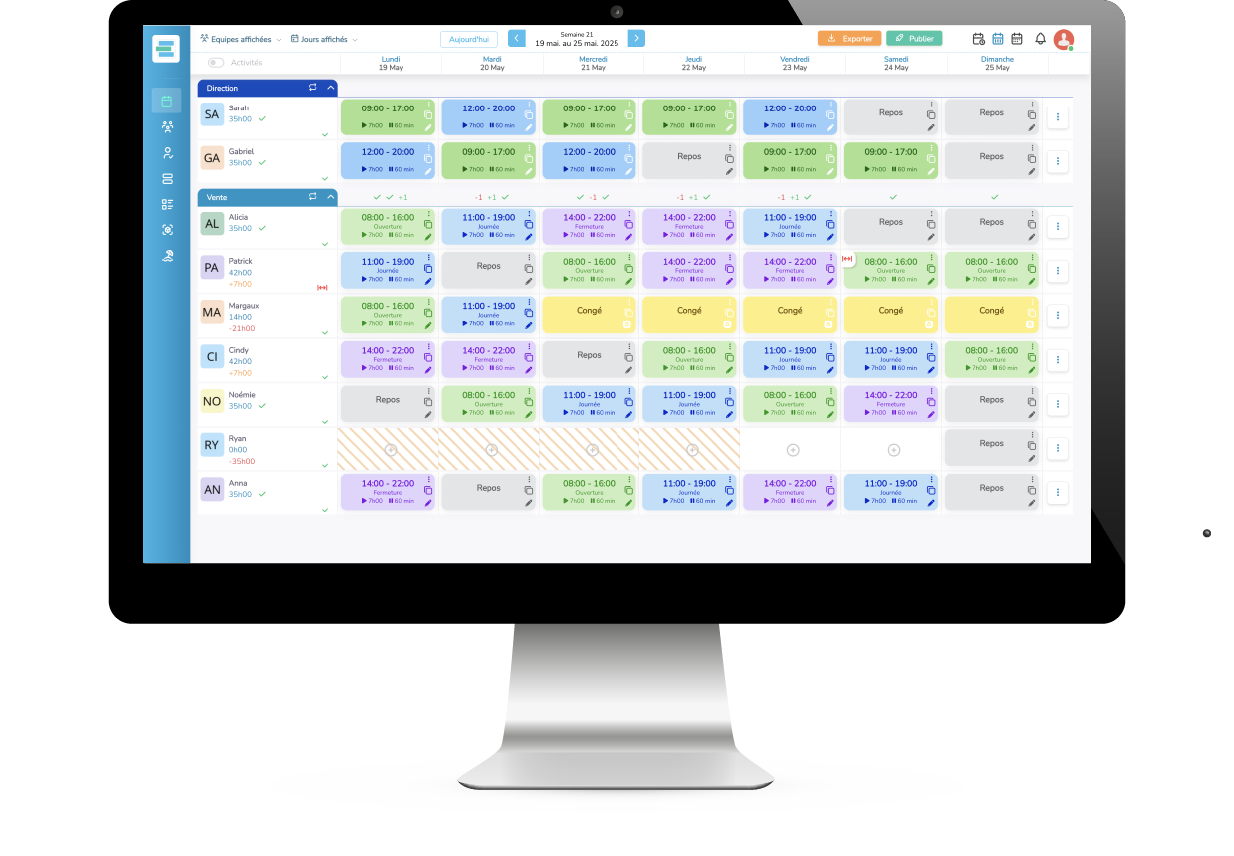
- Real-time visual alerts while building the schedule, not after publishing.
- Schedule publishing in a few clicks, with a mobile collaborator app.
- Geolocated mobile time clock with no physical terminal or badge.
- Ready-to-use payroll report (regular hours, premiums) exportable as CSV/Excel.
- 30-day trial with full features, no card required, on real schedules.
Cons
- No legal entity disclosed in the legal notice, only a publication director.
- Public help center announced but not live yet at verification.
- Privacy policy is thin on GDPR rights compared to other publishers in the space.
- Per-employee pricing that adds up quickly for a large team with variable hours.
Planeezy: when it makes sense.
Choose Planeezy if scheduling and time-tracking are still handled manually today and rule mistakes cost you time or money. Test the 30-day free trial on a real schedule before choosing between the Planning-only offer and the one with time clocking.
Keep if
You manage a team with variable hours (restaurants, retail, pharmacy, services) and build schedules yourself.. You want rule violations (rest periods, maximum duration) flagged while building the schedule, not after the fact.
Planeezy becomes worthwhile when
- You use it at least once a week
- The monthly cost ($3.6) is small next to the time it saves you
Challenge if
You already have a full HRIS covering scheduling, time-tracking and payroll.. Your structure has fixed, regular hours with no complex constraints to arbitrate.
Planeezy becomes too expensive when
- You use it less than once a month
- A simple free version or a tool already in your stack would do